Skip to content

Capability distribution for embodied robotics

Discover, reuse and
distribute robot assets

BotWorld turns the models, motions, skills, scenes and data scattered across your R&D process into digital capability assets that can be reused, transferred and distributed — connecting developers, robotics companies and real-world deployments.

Robot Intelligence=Hardware×Digital Capability Assets

Partner assets already on BotWorld

  • Galaxea

    GaiaHand20

  • High Torque

    Robot lineup

  • RoMeLa

    MIDAS Hand

  • XLeRobot

    XLeRobot

  • Createra

    Createra Zero

  • Unitree

    Go2 · G1

The thesis

A robot's edge now comes from its digital capability assets

Robots are moving from automated equipment to intelligent agents, and value is accumulating in data, models, skill libraries and simulation assets. The competition has shifted from who can build a robot to who can give a robot new capabilities fastest.

Four classes of capability asset

  • Robot model assets

    Body structure, links and joints, collision geometry, physical parameters and sensor configuration.

    • URDF
    • MJCF
    • USD
    • SDF
    • Xacro
  • Motion & skill assets

    Standing, walking, grasping, obstacle avoidance and manipulation clips, retargetable across bodies.

    • BVH
    • CSV
    • NPZ
    • PKL
  • Scene & task assets

    Scene packs, demo projects, task flows and benchmarks for reproducible comparison.

    • Scene Pack
    • Demo
    • Benchmark
  • Data & training assets

    Simulation data, real-world data, RL environments, policy models and evaluation results.

    • ONNX
    • RL Env
    • Dataset

Products

One toolchain, from asset to running robot

BotWorld distributes, BotLab runs, and URDF Studio, Motion Studio and OmO complete the workflow. Each tool stands on its own, or they chain together around a shared asset.

BotWorld

Available

Robot asset platform

The entry point for assets and the distribution layer beneath every tool. Once you find what you need, import it straight into URDF Studio, Motion Studio or BotLab.

  • 模型
  • 动作
  • 技能
  • 场景
  • 案例
Asset types
5
Partners onboard
6+

Capabilities

  • One asset entry point

    Asset, data and project galleries in one place, filterable by robot body, mobile base, dexterous hand and more.

  • Search and detail pages

    Search by robot, asset name or task keyword. Detail pages show a model preview, file formats, the creator and download/import actions.

  • One-click import to a workspace

    Import to workspace hands the model and its dependencies straight to URDF Studio.

  • Upload and accumulate

    Upload assets, collect favourites, submit work and manage personal or team assets.

URDF Studio

Available

Modeling tool

A browser-based robot authoring workstation for topology, visual and collision geometry, hardware parameters and multi-file workspaces — without hand-editing XML for every change.

  • URDF
  • MJCF
  • Xacro
  • SDF
  • USD
GitHub stars
447
License
Apache-2.0

Capabilities

  • Multi-format import

    Single files, folders, ZIP bundles and .usp project archives — URDF, MJCF, Xacro, SDF and USD, with their mesh dependencies resolved.

  • Visual inspection

    Toggle visual meshes, collision meshes, axes, joint axes, centre of mass and inertia to locate structural problems.

  • Structure tree and properties

    Manage links, joints, meshes and file structure; edit pose, rotation, parent/child links, joint type and motion range.

  • Assembly and collision optimisation

    Assemble multiple robots into one workspace with bridge joints; configure motors, transmission ratios, damping and friction.

  • AI generation, review and reports

    Generate robots from natural language, run configurable automated inspections and export PDF/CSV reports.

  • Multi-format export

    Export URDF, MJCF, USD, SDF, Xacro, CSV/BOM, PDF, ZIP and .usp project archives.

Motion Studio

Beta

Motion tool

A workbench for motion data: retarget BVH and similar assets onto a target robot, verify frame by frame on the timeline, then export downstream.

  • BVH
  • CSV
  • NPZ
  • PKL
Datasets
LAFAN · AMASS · SONIC
Backend
BotMotion

Capabilities

  • Motion asset import

    Import BVH and related motion files, reading skeleton count, sample rate and duration.

  • Preview and timeline

    Play, scrub and step through motion on a timeline to check skeletal movement.

  • Parameter mapping and retargeting

    Drive retargeting, device adaptation and output configuration from the parameter panel, including collision optimisation and partial mapping.

  • Pose transition and smoothing

    Handle transitions between poses and smooth motion data to remove jitter and discontinuities.

BotLab

Available

Simulation runtime

A visual control-graph editor and simulation runtime in the browser. Wire observation, processing, inference, control, terrain and visualisation nodes into an executable graph that drives MuJoCo in-page.

  • MuJoCo
  • ONNX
  • WASM
  • .mscp
Physics
MuJoCo 3.8
Inference
ONNX Runtime Web

Capabilities

  • Node orchestration

    Drag observation, processing, inference, control and visualisation nodes from the library and wire them into a control chain, with dynamic ports and template insertion.

  • Template components

    Reusable PD controller, RL policy, MuJoCo policy and WBC policy modules shorten setup.

  • In-browser simulation

    Loads MuJoCo WASM, robot models and terrain; observation nodes read qpos, qvel, IMU and projected gravity, and control output is written back to MuJoCo.

  • Run, debug and publish

    Start, pause, replay and profile; Scope time-series, FPS and real-time factor; package projects as .mscp and publish a standalone runtime bundle.

OmO

In development

Hardware tool

A unified platform for deploying to, monitoring and debugging physical robots — carrying capabilities validated in simulation onto real hardware.

  • v0.1.0-alpha
Coming soon

Capabilities

  • Deployment

    Firmware flashing and one-click deployment to physical robots.

  • Live telemetry

    Real-time telemetry and a device status dashboard.

  • On-robot debugging

    Interactive debugging tools that talk to the robot hardware.

Workflow

Robot development shouldn't start from scratch

Find the building blocks in BotWorld, shape them with the right tool, run and verify them in BotLab, then take them to hardware — and the new capability returns to BotWorld to be distributed.

  1. 01

    Find

    Find and reuse models, motions, skills, scenes and cases in one place instead of hunting for them every time.

  2. 02

    Author

    Fix model structure in URDF Studio; retarget motion onto the target body in Motion Studio.

  3. 03

    Simulate

    Load the asset and run lightweight simulation, motion playback and physics checks — faster than standing up an environment first.

  4. 04

    Deploy

    Deploy to physical hardware through OmO, then monitor and debug on the robot.

Real-world feedback flows back; capabilities keep improving

Read the full quickstart

Architecture

Capability maturity layers

From digital assets to real-world capability: producing, validating, deploying and distributing what a robot can do.

  1. L1

    Robot Asset & Authoring Layer

    Robot Asset & Authoring Layer

    • Model, structure, material and semantic standardisation
    • Motion assets, skill clips, authoring and packaging
    • URDF / Mesh / CAD / MJCF / USD / Motion Asset
  2. L2

    Simulation Runtime Layer

    Simulation Runtime Layer

    • Tasks, scenes and control interfaces
    • Physics engine, sensors, virtual interfaces
    • Runnable, testable, verifiable

    Delivered by

  3. L3

    Real-world Deployment Layer

    Real-world Deployment Layer

    • Skill validation, policy testing, execution tuning
    • Robot connection, deployment, automation, monitoring
    • From simulation to real-world execution

    Delivered by

  4. L4

    Skill & Agent Distribution Layer

    Skill & Agent Distribution Layer

    • Skill, Agent and App capability packaging
    • Standard interfaces, reusable and composable
    • One-click invocation and deployment

    Delivered by

  5. L5

    Robot Intelligence Network

    Robot Intelligence Network

    • Multi-robot collaboration and capability sharing
    • Closed-loop data and continuous learning
    • Cross-embodiment and collective evolution

    Delivered by

    On the roadmap

Get started

Which product should I start with?

BotWorld is the way in. Once you find a model, import it straight into URDF Studio to inspect, edit and export it.

  • I need to find a robot model or asset

    BotWorld
  • I need to view, inspect or edit a model

    URDF Studio
  • I'm not sure where to start

    Start in BotWorld and look for what you need

    BotWorld

Suggested first run-through

  1. 1

    Find a robot model in BotWorld

  2. 2

    Open its asset detail page

  3. 3

    Import the model into URDF Studio

  4. 4

    Inspect its structure tree and joints

  5. 5

    Make a small edit, then export it locally

After this you will understand how BotWorld and URDF Studio fit together, and can carry a model through a full basic workflow.

Read the full quickstart

Ecosystem

Keep capability circulating and compounding

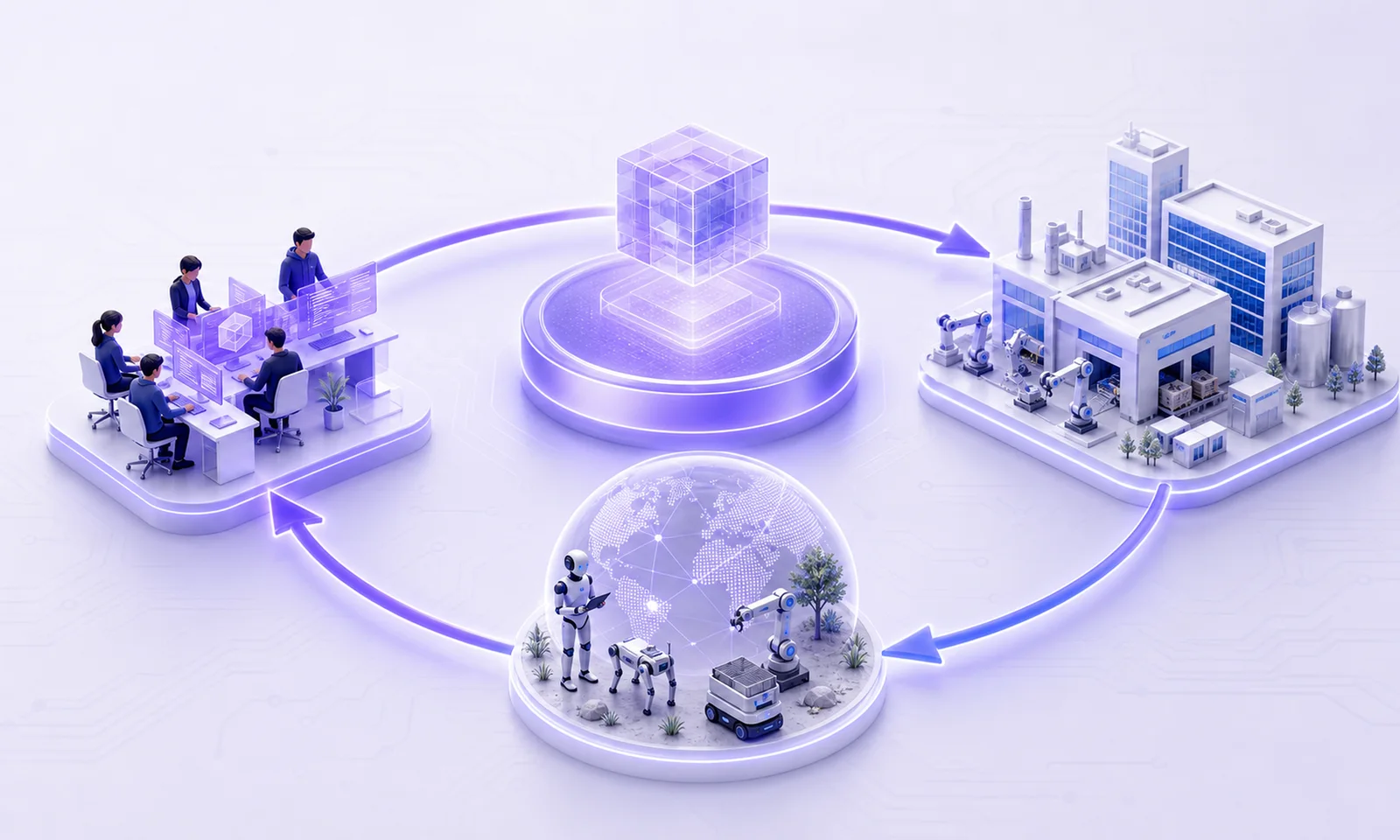
BotLab and BotWorld connect developers, robotics companies and real deployments into a flywheel. This is not a one-off tool but a network where robot capability keeps evolving.

Ecosystem flywheel: developers, the platform hub, robotics companies and real-world scenarios joined by a closed loop.

Create — distribute — apply — improve

  1. 01

    Capability creation

    Developers create models, skills and scenes in BotLab and the authoring tools.

  2. 02

    Asset distribution

    Versions, docs, dependencies and licensing are attached, then the packaged capability is distributed on BotWorld.

  3. 03

    Deployment

    Robotics companies pull the asset and deploy it into real operations instead of rebuilding it.

  4. 04

    Feedback

    Real-world operation produces new data, problems and requirements that flow back and improve the capability.

Open source & community

The tools are open on GitHub

URDF Studio is Apache-2.0 licensed and lives in the OpenLegged organisation.

View on GitHub

Start by finding one robot model

No environment setup. Open a browser to find assets, edit models and run a simulation.